A Turing-complete dataflow programming language designed for humans and AI. Programs are graphs of nodes and threads — readable at a glance, writable with minimal context.
cotton fabric printed in various colours and designs with distinctive borders.
The language
Programs as graphs
A kitengi program is a graph of nodes connected by threads. Data flows through the graph as messages. There is no global mutable state and no implicit sequencing — a node runs only when all of its required inputs have received a message.
◎
Nodes
The fundamental processing unit. Each node has typed input and output ports. Built-in kinds cover arithmetic, control flow, collections, text, filesystem, networking, and streaming.
→
Threads
Directed connections from an output port to an input port. A single output can fan out to multiple inputs. Messages carry an ID, a port name, and a data payload.
{ }
Patterns
Reusable subgraphs packaged as a single node. Share patterns as .ktip files on GitHub and reference them directly in any program.
▶
Visual editor
Build and run programs visually in the browser at app.kitengi.dev. Features include real-time data flow visualization, slow mode, pause, and a built-in test runner.
Design goals
Built for humans and AI to work together
Kitengi is designed so that humans can understand programs at a glance, and AI can write them accurately with minimal context.
◑
Easy for humans to read
Programs are explicit graphs. Every connection is visible. There is no hidden control flow, no shared mutable state, and no execution order to reason about — each node does one thing.
◈
Small context for AI
Strong conventions mean that an AI only needs to know the available node kinds and port types to write a correct program. There are no idioms to guess and no ambiguous syntax.
≡
Strong conventions
One way to declare a node. One way to connect ports. One way to define a pattern. Consistent structure across every program makes both reading and writing predictable.
⊞
Composable by design
Patterns let you package any subgraph as a reusable node. AI can generate a pattern for a well-defined task; humans can snap it into a larger program without reading its internals.
One program, two views
Human-readable programs
The same program is a graph for humans and a .kti file for AI. The visual graph is easy to read at a glance; the text format is line-oriented and unambiguous — an AI can write it and a machine can parse it with no preprocessing.
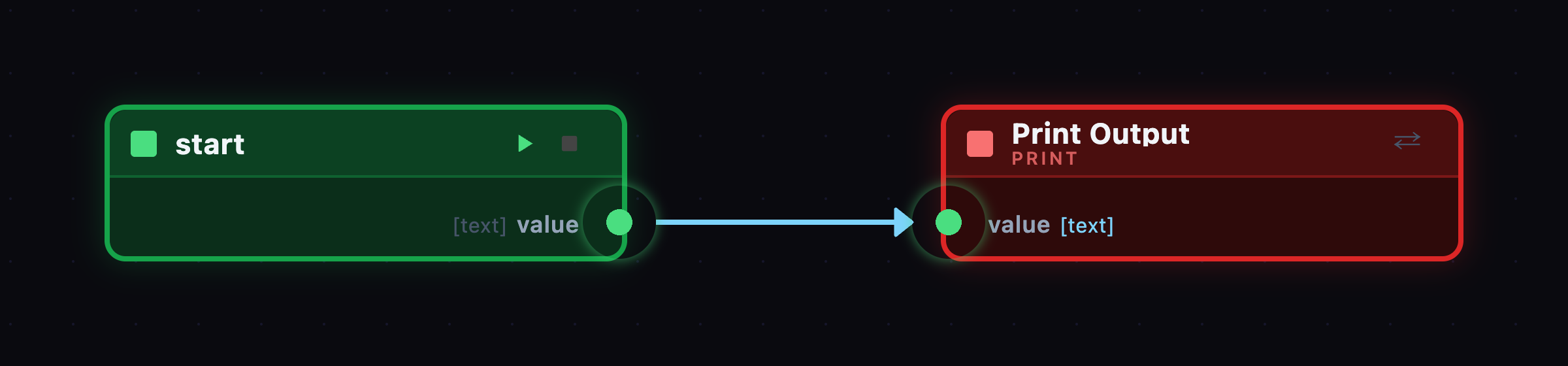
For humans — the graph
For AI — the .kti source
program | Hello World!
    A simple program that prints "Hello World!" when triggered.

value[text] = Hello World!

-> start
    value -> print:value

print:print | Print Output
<- value[any]
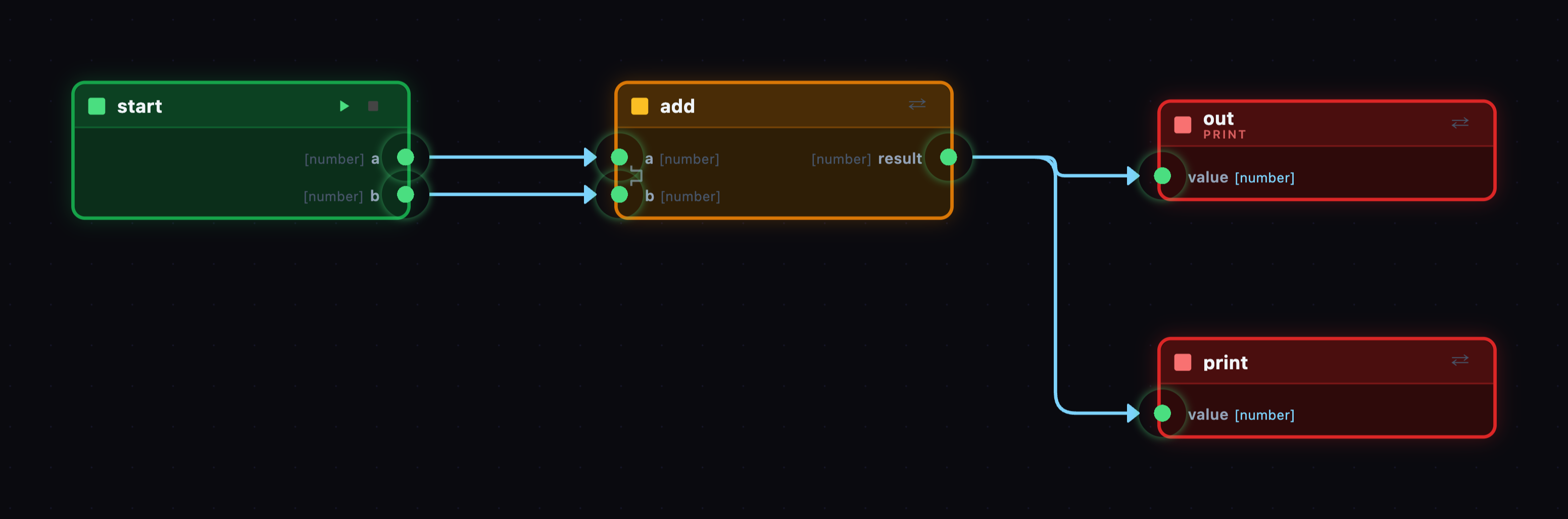
For humans — the graph
For AI — the .kti source
program | Adder
    Adds 2 + 3 and prints the result

a[number] = 2
b[number] = 3

-> start
    a -> add:a
    b -> add:b

add:add
<- a[number]
   b[number]
-> result[number] -> out:value
                  -> print:value

print:out
<- value[any]

print:print
<- value[any]
Open source
Free and open
Kitengi will be open source. The language spec, standard library, and runtimes will all be published to GitHub.
kitengi/spec coming soon
The language specification and standard node definitions. All built-in node kinds are defined as .ktip files.
kitengi/contrib-patterns coming soon
Community patterns. Reusable .ktip files ready to reference in any program.
kitengi/kitengijs coming soon
The JavaScript runtime. Runs in Node.js and in the browser — the same runtime powering app.kitengi.dev.
kitengi/kitengi-electron coming soon
The Electron desktop app. The same visual editor with native desktop integration and a built-in bridge for filesystem and networking.
kitengi/kitengi-compiler coming soon
An LLVM-based native compiler for kitengi programs. Currently in development.
Coming soon
What's next
Kitengi is under active development. Here's what's on the roadmap.
AI integration — Build and edit programs with AI assistance directly in the editor.
Package registry — Discover, share, and install community patterns with dependency management.
Hosting — Deploy programs to the cloud and run them as always-on services.
Start building
The kitengi editor runs entirely in the browser — no install required.